


Publix
4.818.80K Reviews
App Specs
- Version
- 5.3.2
- Updated On
- License
- Free
- Downloads
- 5,000,000+
- Developer
- Publix Super Markets Inc.
- Categories
- Lifestyle
- Platform
- Android, iOS
Screenshots
 Analysis by AppCompare
When several people are responsible for the same grocery run, the hardest part is often not finding food but keeping the plan straight: what has run out, what is already covered, and which offers are worth checking. I find Publix most useful when I treat it as a practical companion to a shop I already expect to make, rather than as a replacement for every part of household planning. Its lists, coupons and ordering options can reduce small bits of friction, but the value depends on how well they fit the way your household shops.
A shared shop works best with one clear plan
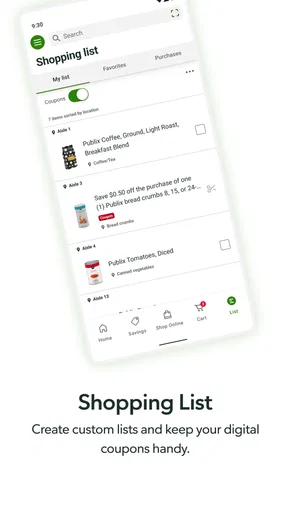
Picture a familiar weekday situation: one person is heading past the supermarket after work, while someone else at home remembers that breakfast staples are running low. A list in the app can give the shopper a reference point and help avoid relying on scattered messages or memory. I would use it to prepare the list before leaving, then check it as I move through the store instead of trying to build the whole plan in the car park.
For a household with different routines, a useful approach is to make one person the list organiser for a particular trip and ask everyone else to send additions before a simple cutoff, such as when the shopper starts driving. That is not a special coordination feature; it is a habit that makes the app’s list more dependable. Without an agreed routine, two people can still buy the same item or overlook a last-minute request, whichever app they use.
I also like separating essentials from ideas. Put the items needed for the next few meals on the active list, and treat recipe inspiration as a separate planning step before shopping. That keeps a promising recipe from turning into an unplanned basket of ingredients that nobody has time to cook. The app can support the list-making part, but the household still has to decide what is actually needed.
Set practical boundaries before sharing a device
If several people use one phone or tablet, it is worth agreeing who will browse offers, add items and handle an order. A shared device can make a list easy to consult, but it can also blur who made a change or whether a coupon was selected for the current trip. I would keep the list itself focused on the household’s immediate needs and avoid assuming that every person using the device has the same shopping priorities.
Account access deserves a little more thought than list access. A device left open in a shared space may expose whatever account information is available in the app, so I would follow the device’s ordinary lock and sign-in habits and avoid handing it over casually. That is sensible housekeeping, not a claim that Publix provides family profiles or special parental controls.
There is also a practical difference between letting someone add a grocery item and letting them place an order. Before a pickup or delivery order is submitted, the person responsible for it should review the basket, timing and any choices that affect the household. That final check is especially useful when several people have contributed requests, since the person who pays or collects may need to resolve a substitution or other order detail.
Worth Reading Before You Choose

EA SPORTS FC Mobile 26 Is a Bigger Football Game, but It Takes Time

Flipboard Shows What News Apps Must Do Beyond the Feed

Switching to Android Auto Means Rethinking Your Driving Routine

Google Calendar Makes a Crowded Week Easier to Manage

Ludo King Makes the Most of the Minutes Between Plans

Baby Panda World Brings Quick Play to Modern Phones, but Its Game Library Feels Busy
Offers are helpful, but only when they match the plan
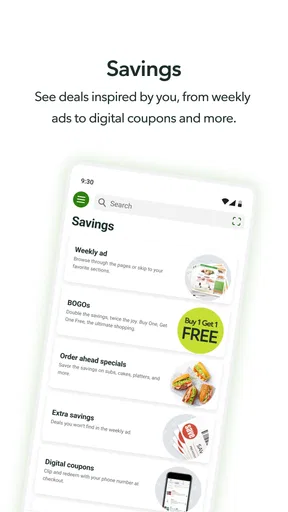
Digital coupons can be a convenient alternative to paper offers because they are available while preparing for a Publix shop. My tip is to look at them after drafting the essentials list, not before. Starting with deals can encourage impulse additions; checking them against items you were already going to buy makes it easier to judge whether an offer genuinely helps.
That distinction matters when comparing the app with a paper flyer, a general shopping-list app or a store-agnostic deal finder. The Publix app is naturally more useful for someone already shopping at Publix and interested in its own offers and services. A general list tool may be better when several stores are involved or when everyone in a household needs a shared system across retailers. Neither approach is automatically cheaper: a coupon is useful only if it applies to something you want and the rest of the basket still suits your budget.
Browsing promotions can also be a way to plan a flexible meal rather than chase a discount blindly. If an offer fits a dish you already know your household will eat, it can help shape the shopping list. If it requires extra ingredients, a different store visit or food likely to go unused, I would skip it. The useful saving is the one that reduces the cost of a real plan, not the one that makes the app feel busy.
Choose a shopping method that fits the day
In-store shopping, pickup and delivery solve different problems. I would use the list while walking the aisles when I want to choose products myself or make small decisions as I shop. Pickup makes more sense when I have a clear basket and would rather collect it than spend time browsing. Delivery can be convenient when getting to a store is the bigger obstacle, though it is still worth checking the order carefully before relying on it for a particular meal.
For example, if I am planning dinner after work, I can use the recipe section to find an idea, move its ingredients onto a list and check relevant coupons before deciding what to buy. If the evening is too tight for a full shop, placing an order for pickup or delivery may be a more practical route than adding a hurried stop. The key is to prepare the basket early enough to review it; the app cannot make a last-minute plan realistic if the household has not agreed on what dinner should be.
People often wonder whether this is useful only for large weekly shops. I think it can also help with a short top-up, especially when the list is just a few forgotten essentials. For a single item, though, opening an app and preparing an order may take more effort than a quick stop, depending on the trip. I would choose the method based on the errand, rather than treating pickup or delivery as automatically faster.
Another reasonable question is whether the app replaces checking a store directly. I would still use its store information when planning a visit, and confirm the details that matter to that trip rather than assuming every location or service works identically. For a comparison across several retailers, a broader shopping tool or each store’s own app may be more suitable than expecting one Publix-focused app to answer every question.
Features You’ll Love
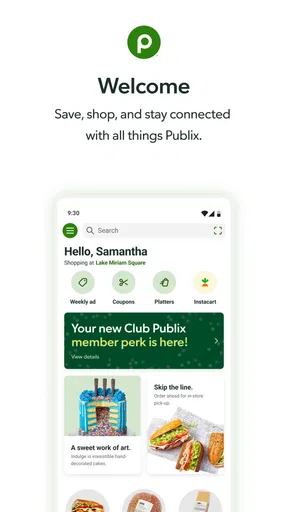
First off, let’s talk about the app’s user-friendly interface. The moment you open it, you’re greeted with a clean and intuitive design that makes navigation a breeze. Whether you’re tech-savvy or a bit of a technophobe, you’ll find it super easy to get around.
One of the standout features is the digital coupons. No more clipping paper coupons or forgetting them at home. You can easily browse and select coupons directly in the app and apply them at checkout. This feature alone can save you a considerable amount of money, especially if you’re a frequent shopper.
Shopping Lists Made Simple
Creating and managing shopping lists is another area where the app shines. You can add items manually or use the barcode scanner to quickly add products you’ve run out of. Plus, the app categorizes items for you, making it easy to navigate the store aisle by aisle. Personally, I find this feature incredibly handy when I’m in a hurry or shopping for a big family dinner.
If you’re into meal planning, the app offers a recipe section where you can find inspiration and add ingredients directly to your shopping list. It’s like having a personal chef who also happens to be a bargain hunter!
Order and Pickup: The Game Changer
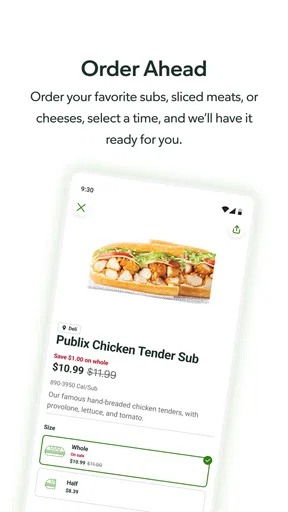
Now, let’s talk about the real game changer: the order and pickup feature. You can place an order through the app and choose a pickup time that works for you. No more wandering through aisles or waiting in line. When your order is ready, just swing by the store, and they’ll bring it out to you. It’s so convenient, especially for busy parents or anyone juggling a hectic schedule.
And for those days when you just can’t make it to the store, the app also offers delivery services. Whether you need groceries for the week or just a few items for dinner, it’s all at your fingertips.
Staying Connected with Publix
The app keeps you in the loop with store updates, special promotions, and upcoming sales. You’ll never miss out on a deal, which means more savings for you. Plus, you can easily find store locations, hours, and contact information if you need assistance.
What I’d Like to See Improved
While the app is pretty fantastic, there’s always room for improvement. Occasionally, the app can be a bit slow to load, especially during peak shopping times. Also, integrating a feature to compare prices with competitors could be a valuable addition for those of us who love a good deal hunt.
Some users have mentioned that they’d like more customization options for notifications, so they only receive alerts that are relevant to their shopping habits. That being said, the app team seems responsive to feedback, so fingers crossed for future updates!
Who I’d Recommend It To
Publix is a lifestyle app from Publix Super Markets Inc., and it makes the most sense for people who already shop at Publix or are considering making it a regular stop. It is free, rated for Everyone, and has a 4.8 average from around 156,000 ratings; more than 5 million installs suggest it has found a broad audience. I would not treat popularity as proof that it suits every shopper, but it does indicate that the app is a familiar option for many people.
The app has been around since November 20, 2012, and its current version is 5.2.1, with Android 10 as the minimum operating-system requirement. Those details are worth checking against your own device before you plan to rely on it. For someone who shops at multiple chains, wants price comparisons across stores, or prefers a retailer-neutral household list, a general list app or another store’s app may be the better everyday hub.
Families can use it as a shared reference on a shopping trip, but I would not assume it automatically coordinates separate accounts or household members. It is better viewed as a set of shopping tools than as a family-management system. Adults can agree on who maintains the list and who finalizes an order; younger users should have an adult review purchases and account activity. The Everyone age rating describes the app’s content suitability, not a substitute for those household boundaries.
Wrapping It Up
All in all, the Publix app is a solid tool for anyone looking to make grocery shopping more efficient and cost-effective. Whether you’re a regular Publix shopper or just exploring new ways to streamline your grocery trips, this app is worth checking out. The combination of convenience, savings, and ease of use makes it a winner in my book.
So, give it a whirl and let me know what you think. Happy shopping!
Pros
- User-friendly interface enhances shopping experience.
- Digital coupons offer significant savings.
- Order tracking is precise and reliable.
- Variety of payment options available.
- Store locator is accurate and helpful.
Cons
- App occasionally experiences slow loading times.
- Limited customization in notification settings.
- Some users report login issues intermittently.
- Product availability varies by location.
- Push notifications can be overwhelming.
FAQs for Publix
What is Publix and how does it work?
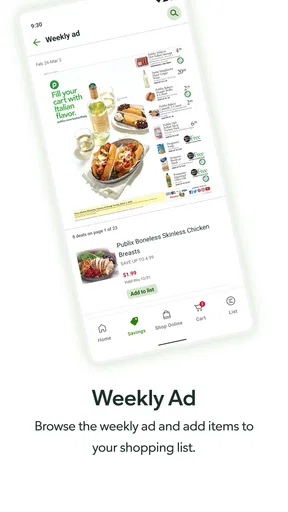
Publix is a user-friendly app designed for grocery shopping, allowing users to browse and order products directly from their nearest Publix store. The app provides features such as digital coupons, weekly ads, and the ability to create shopping lists, streamlining the shopping experience for convenience and efficiency.
Can I use Publix for online ordering and delivery?
Yes, Publix offers online ordering and delivery services through its app. Users can choose between curbside pickup or home delivery, depending on their location. The service partners with delivery services to ensure groceries are delivered efficiently, making it a practical choice for those with busy schedules.
Does the Publix app offer any discounts or promotions?
The Publix app features a variety of digital coupons and promotions that users can easily access and apply to their orders. By regularly updating its offers, the app ensures users can take advantage of the latest deals and discounts, helping to save money on their grocery shopping.
Is the Publix app compatible with both Android and iOS devices?
Yes, the Publix app is available for download on both Android and iOS platforms. It is designed to offer a seamless experience across devices, ensuring users can access all its features whether they are using a smartphone or tablet, providing flexibility and convenience.
How secure is my personal information when using the Publix app?
Publix prioritizes the security of user information by implementing robust security measures, including encryption and secure payment gateways. The app ensures that personal and payment details are protected, giving users peace of mind while managing their grocery shopping digitally.


